grid title
grid subtitle
The purpose of this document is to describe a step-by-step implementation guideline for new API clients.
All the CMCCs APIs are exposed as a product named "API4C” or " API4PSP" and combine Payment services (Instant SCT, SCT, INTL payments, domestic payments, SEPA Direct Debits …) and Reporting services (Balances, Intradays and End of Day statements).
BNP PARIBAS provides its customer with a pair of dedicated environments: test/qualification for the integration and testing of the APIs and a Live environment for production.
For the onboarding, please provide the following information to the BNP Paribas implementation team to populate the appendices of the Direct Connectivity Agreement (DCA)
NB: For the qualification onboarding, the DCA doesn’t have to be signed.
In order to make sensitive information available to you, a secure sharing space will be created by the implementation team and an associated access granted to the person who will act as the customer representative/ point of contact (as provided in the DCA appendices, Schedule 3).
You will have a private directory on SFS to exchange files and sensitive data with the Implementation Team.
The subscription process to SFS will trigger the sending of an automatic email to your point of contact. The email will contain the login name and a link to set up a password. The subscription will be completed after the password has been set.
Connection to the secured sharing is a two-step process:
To access SFS: https://securesharing.bnpparibas.com/pfv2/ws/sfs-itg
Mandatory information for the creation of SFS sharing space are the last name, first name, email address and phone number of the person in charge together with the name of the customer. (data to be provided in the DCA Schedule 3)
To use the APIs, an SSL certificate is required to access the BNP Paribas infrastructure (API gateway) for all the environments (Qualification and Production).
With a validity of at least one year, you can find below certification authorities (CA) currently accepted by BNP Paribas:
Certification Owner | Issuer |
| CN=DigiCert SHA2 Secure Server CA, O=DigiCert Inc, C=US | CN=DigiCert Global Root CA, OU=www.digicert.com, O=DigiCert Inc, C=US |
| CN=DigiCert SHA2 Assured ID CA, OU=www.digicert.com, O=DigiCert Inc, C=US | CN=DigiCert Assured ID Root CA, OU=www.digicert.com, O=DigiCert Inc, C=US |
| CN=DigiCert TLS RSA SHA256 2020 CA1, O=DigiCert Inc, C=US | CN=DigiCert Global Root CA, OU=www.digicert.com, O=DigiCert Inc, C=US |
| CN=DigiCert Global G2 TLS RSA SHA256 2020 CA1 | CN=DigiCert Global Root G2 |
| CN = DigiCert SHA2 Extended Validation Server CA | CN = DigiCert High Assurance EV Root CA |
| CN=RapidSSL RSA CA 2018, OU=www.digicert.com, O=DigiCert Inc, C=US | CN=DigiCert Global Root CA, OU=www.digicert.com, O=DigiCert Inc, C=US |
| CN=Entrust Certification Authority - L1K, OU="(c) 2012 Entrust, Inc. - for authorized use only", OU=See www.entrust.net/legal-terms, O="Entrust, Inc.", C=US | CN=Entrust Root Certification Authority - G2, OU="(c) 2009 Entrust, Inc. - for authorized use only", OU=See www.entrust.net/legal-terms, O="Entrust, Inc.", C=US |
| CN=GlobalSign GCC R3 DV TLS CA 2020, O=GlobalSign nv-sa, C=BE | CN=GlobalSign, O=GlobalSign, OU=GlobalSign Root CA - R3 |
| CN=GlobalSign RSA OV SSL CA 2018, O=GlobalSign nv-sa, C=BE | CN=GlobalSign, O=GlobalSign, OU=GlobalSign Root CA - R3 |
| CN=Sectigo RSA Client Authentication and Secure Email CA, O=Sectigo Limited, L=Salford, ST=Greater Manchester, C=GB | CN=USERTrust RSA Certification Authority, O=The USERTRUST Network, L=Jersey City, ST=New Jersey, C=US |
| CN=Sectigo RSA Domain Validation Secure Server CA, O=Sectigo Limited, L=Salford, ST=Greater Manchester, C=GB | CN=USERTrust RSA Certification Authority, O=The USERTRUST Network, L=Jersey City, ST=New Jersey, C=US |
| CN = Sectigo RSA Organization Validation Secure Server CA | CN=USERTrust RSA Certification Authority, O=The USERTRUST Network, L=Jersey City, ST=New Jersey, C=US |
| CN=TBS X509 CA persona 2, OU=TBS INTERNET CA, O=TBS INTERNET, L=Caen, ST=Calvados, C=FR | CN=USERTrust RSA Certification Authority, O=The USERTRUST Network, L=Jersey City, ST=New Jersey, C=US |
| CN=SSL.com RSA SSL subCA, O=SSL Corporation, L=Houston, ST=Texas, C=US | CN=SSL.com Root Certification Authority RSA, O=SSL Corporation, L=Houston, ST=Texas, C=US |
| CN=Certinomis Corporate G4, OU=AC Intermediaire - Subsidiary CA, O=CertiNomis, C=FR | CN=CertiNomis, OU=AC Racine - Root CA, O=CertiNomis, C=FR |
| CN = QuoVadis Global SSL ICA G3, O = QuoVadis Limited, C = BM | CN = QuoVadis Root CA 2 G3, O = QuoVadis Limited, C = BM |
| CN = USERTrust RSA Certification Authority, O = The USERTRUST Network, L = Jersey City, S = New Jersey, C = US | CN = USERTrust RSA Certification Authority, O = The USERTRUST Network, L = Jersey City, S = New Jersey, C = US |
| CN = DigiCert Assured ID Root CA G2 | CN = DigiCert Assured ID Client CA G2 |
| CN = Certinomis - Corporate CA G5 | CN = Certinomis - Root CA G4 |
| CN = Buypass Class 3 CA G2 QC WA | CN = Buypass Class 3 Root CA G2 QC |
| CN = Go Daddy Secure Certificate Authority - G2 | CN = Go Daddy Root Certificate Authority - G2 |
| CN = AlphaSSL CA - SHA256 - G4 | CN = GlobalSign Root CA |
| CN = Entrust Certification Authority - L1M | CN = Entrust Root Certification Authority - G2 |
| CN = Secure Site CA G2 | CN = DigiCert Global Root CA |
| CN = DigiCert EV RSA CA G2 | CN = DigiCert Global Root G2 |
| CN = MULTICERT QWAC Certification Authority 005 | CN = MULTICERT Root Certification Authority 01 |
| Thawte EV RSA CA G2 | DigiCert Global Root G2 |
| Thawte TLS RSA CA G1 | DigiCert Global Root G2 |
| Entrust OV TLS Issuing RSA CA 2 | Sectigo Public Server Authentication Root R46* |
| Sectigo Public Server Authentication CA DV R36 | Sectigo Public Server Authentication Root R46 |
Sectigo Public Server Authentication CA OV R36 | Sectigo Public Server Authentication Root R46 |
Please note that other certificate authorities could be accepted, but BNP Paribas would need to validate that it is aligned with its security norms and would need to onboard it.
Send the public part of the ssl certificate to the implementation manager (*.cer, *.crt)
Notes:
Please specify to the Implementation team if the SSL certificate will be the same for both environments: Qualification and Production.
For SSL Certificate renewal, you will have to make a token API call with your new SSL certificate. If the call is OK, nothing is expected. If the token call fails, the client will have to provide the new public part of the certificate to BNP paribas.
Once all the steps 2.1 to 2.4 are completed, BNP Paribas implementation team will set up the testing environment for you. The information below will be exchanged with you using your SFS space:
For all the API proposed by BNPP, you need to make an Authentication on the BNPP Gateway:
Screen of the Token’s answer:
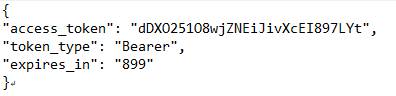
Expected behavior:
This API has endpoints protected by 2-legged OAUTH.
Authentication QUICK GUIDE for 2-legged OAUTH:
Environment | URL (POST) |
Staging | https://api.staging.cashmanagement.bnpparibas/auth/oauth2/token |
Live |
Name | TypeParams | Mandatory | Format | Value |
Authorization | header | M | String | Basic YOURAPPCREDENTIALS |
Content-Type | header | M | String | application/x-www-form-urlencoded |
grant_type | body | M | String | client_credentials |
scope | body | M | String | corporate-banking:instant-payment:* |
Access token (YOURTOKEN) is returned as part of the json response, inside the field access_token
Perform a request to our API using the access_token previously obtained as a Bearer token.